Data Shell
Data Shell manages databoxes, which are primarily designed for use by App Shell. It acts as the management interface and ensures data integrity utilizing a hash chain.
Key value store
Data will be saved in databox as key value type of data sets like this. View of databox will be table on Web App. If you will not define primary key, the value will be random hash ID.
# DataboxA
---------------------------------------------------------------------------------------------
record1:{ primary_key(col1):value, key(col2):value, key(col3):value, ... key(colX):value }
record2:{ primary_key(col1):value, key(col2):value, key(col3):value, ... key(colX):value }
record3:{ primary_key(col1):value, key(col2):value, key(col3):value, ... key(colX):value }
record4:{ primary_key(col1):value, key(col2):value, key(col3):value, ... key(colX):value }
..
recordX:{ primary_key(col1):value, key(col2):value, key(col3):value, ... key(colX):value }
----------------------------------------------------------------------------------------------
Directory Structure
Data will be stored on Unix file system with indexing and logging transactions.
 sudo ls /usr/local/small-shell/databox/${databox}
 data  def  file  hashchain  index  log  log.dump
Command reference
You can access data through DATA_shell command.
/usr/local/small-shell/bin/DATA_shell
Note
DATA_shell has CLI, you can use these commands with sudo small-shell
e.g.) sudo -u small-shell /usr/local/small-shell/bin/DATA_shell param1:$param1 param2:$param2
Base params
| param | description | usage |
|---|---|---|
| authkey | Set key for authentication | authkey:$authkey |
| session | Set session token for authentication. if you have session, you don't need key | session:$session |
| pin | Set pin for authorize session token | pin:$pin |
| databox | Set target databox name | databox:$databox |
| type | Set target data | type:data , type:log |
| format | Set data format | format:html_tag , format:json , format:none |
| command | Set command | command:$command |
Command Handler params
You can exec several type of command by using DATA_shell "command:" option. Commands will refer to index not refer to data file directly.
| Command | usage |
|---|---|
| exec unix command | command:grep_-v_test_"|"_wc_-l |
| just filtering data | command:word1_word2 |
| show data array | command:show_all |
| show data array with specific line or column | command:show_all[filter=wordA,wordB] |
| show data array by sorting | command:show_all[sort=option,col_num] |
| show data array by filtering specific column | command:show_all[filter=col1{word}] |
| show 100% match data with specific column | command:show_all[match=col1{word}] |
Command handler example
# get data using authkey
authkey="dGVzdDoyOGZkYTJlOTFjODBkZ************"
databox="item.db"
sudo -u small-shell /usr/local/small-shell/bin/DATA_shell authkey:$authkey databox:$databox type:data command:show_all format:json

# get data using session token
session="06deccfc51ec102da4b16db09cf96345a160ce51996fa3533b******"
pin="****"
databox="item.db"
sudo -u small-shell /usr/local/small-shell/bin/DATA_shell session:$session pin:$pin databox:$databox type:data command:show_all format:json
Data Handler params
You can set or show data using data handler.
| Action | usage |
|---|---|
| Set Data | action:set |
| Get Data | action:get |
| Delete Data | action:del |
| Set id | id:$id |
| Create new record | id:new |
| Set data-key scope | key:key_nameA |
| Set data-keys scope | keys:key_name1,key_name2,key_name3 |
| Set data-keys as all | keys:all |
| Set value to the scope | value:$value |
| Set null value | value:%%null |
| Set input_dir | input_dir:/tmp/yyyymmdd |
| app | app:$app |
Data handler example
You can set value by 2 way. First way is just typing value to the commandine with value: tag, another way is just put input_dir and upload key file which has value to the directory.
authkey="dGVzdDoyOGZkYTJlOTFjODBkZ************"
databox="item.db"
id="d5397fed4d6e0da54ed769232e9706d0f5bbf805f251b3a0b2c9083aa00e6874"

-----------------------------
# get value
-----------------------------
sudo -u small-shell /usr/local/small-shell/bin/DATA_shell authkey:$authkey databox:$databox action:get keys:all id:$id format:json

-----------------------------
# set value with CLI input
-----------------------------
# set
sudo -u small-shell /usr/local/small-shell/bin/DATA_shell authkey:$authkey databox:$databox action:set key:description value:test1 id:$id

-----------------------------
# set value with file
-----------------------------
# set
echo "test2" > /tmp/description
sudo -u small-shell /usr/local/small-shell/bin/DATA_shell authkey:$authkey databox:$databox action:set key:description input_dir:/tmp id:$id
Meta characters in index
Some meta characters are removed or changed to specific tags in the index to be searchable. Index is just an index, data itself will not be impacted. It's required to use Meta characters {%*%} when accessing index by executing DATA_shell with command: option.
:  - {%%%}
&  - {%%%%}
/  - {%%%%%}
,  - {%%%%%%}
_  - {%%%%%%%}
(  - {%%%%%%%%}
)  - {%%%%%%%%%}
[  - {%%%%%%%%%%}
]  - {%%%%%%%%%%%}
|  - {%%%%%%%%%%%%}
#  - {%%%%%%%%%%%%%}
$  - {%%%%%%%%%%%%%%}
*  - {%%%%%%%%%%%%%%%}
%  - {%%%%%%%%%%%%%%%%}
'  - {%%%%%%%%%%%%%%%%%}
null - -
Hashchain
Hashchain is created by que.sh for providing proof of data integrity to end user. User can verify hash by calculating it based on following algorithm please check the code. log.dump data will be hashed and it will be integrated to synthesis hash with previous updated keys. Following is code of que.sh
# view /usr/local/small-shell/sbin/que.sh
log_dump="${timestamp} user:${user} primary_key:$primary_key_value updated_key:${updated_key} value:${value} #id:$id"

# gen hash
hash=$(echo "$log_dump" | sha256sum | awk '{print $1}')

# update hash chain
last_hash=$(grep synthesis_hash ${ROOT}/databox/${databox}/hashchain | tail -1 | awk -F ":" '{print $2}')
synthesis_hash=$( echo ${last_hash}${hash} | sha256sum | awk '{print $1}')
echo "$(date +%Y-%m-%d) $(date +%T) id             :$id" >> ${ROOT}/databox/${databox}/hashchain
echo "$(date +%Y-%m-%d) $(date +%T) hash           :$hash" >> ${ROOT}/databox/${databox}/hashchain
echo "$(date +%Y-%m-%d) $(date +%T) synthesis_hash :$synthesis_hash" >> ${ROOT}/databox/${databox}/hashchain
Show hashchain
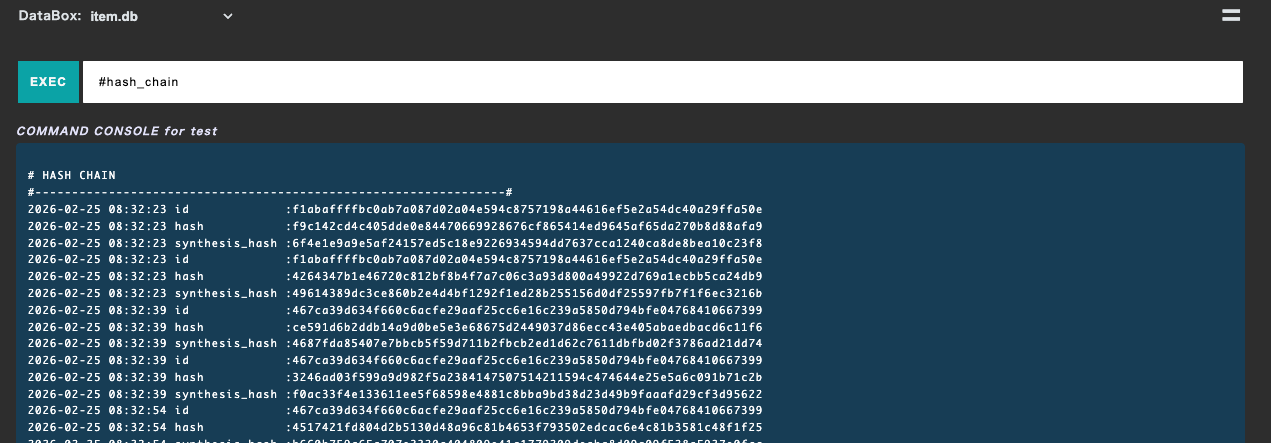
End user can check hashchain on Base App console by using "#hash_chain" tag.
Download hashchain
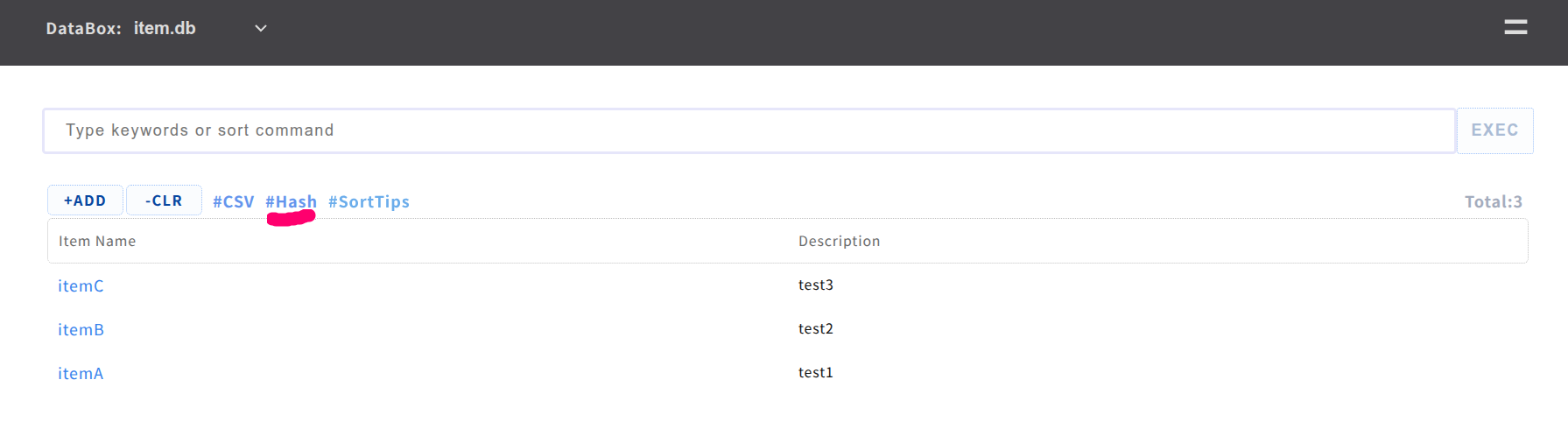
If you want to allow to download hashchain from Base App table, please add following line to table menu.
vi /var/www/def/common_parts/table_menu_rw

--code--
<a href="./base?%%params&req=hash" download="%%databox_hash_chain.txt"><p>#Hash</p></a>
--------
Meta command
"meta" command can be used for gathering meta data.
sudo -u small-shell /usr/local/small-shell/bin/meta
#------------------------------------------------------
# PARAM FOR META
# action(L1).action(L2):target{param}
#----------------------------------------------------------
# meta get.chain:$databox
# meta get.progress:$import_session
# meta get.num:$databox
# meta get.databox
# meta get.server
# meta get.attr:$user{$attribute_key}
# meta get.attr:${app}/${user}{$attribute_key}
# meta get.key:$databox{primary}
# meta get.key:$databox{all}
# meta get.pdls:$databox{filter_word}
# meta get.label:$databox{all}
# meta get.header:$databox{csv}
# meta get.header:$databox{json}
# meta get.tag:$databox
# meta get.tag:$app{$databox}
# meta get.command
# meta get.statistics:ls{html_tag}
# meta get.statistics:ls.$filter_word1,$filter_word2{html_tag}
# meta get.statistics:$statistics{graph}
# meta get.statistics:$statistics{raw_data}
# meta get.shared_pass:$app
# meta get.users
# meta get.users:$app
# meta get.link:$app
# meta chk.form:$databox
#----------------------------------------------------------
Batch for data shell
You can import or delete data using batch scripts.
/usr/local/small-shell/util/scripts
# bat_import.sh
## import file must be csv format
usage: sudo -u small-shell bat_import.sh $authkey $databox $import_file

# data_del.sh
## list file should just contain IDs of target datasets
usage: sudo -u small-shell del_datasets.sh $authkey $databox $list_file
Gen databox by batch
You can define data structure using db.def template, util/scripts/gen_db.sh can generate databox without dialog if you use db.def. template sample is here.
db.def Template
Please freely add column by using "+addcol" declaration. If you don't need to define primary key, please set "hashid" to "primary_key" and "primary_key_label".
#---------------------------------------------------------------
# db definition
#---------------------------------------------------------------

# databox
databox=""

# col1
#-------------------------------------------
# If you don't need to define primary key, please just set "hashid" to both primary_key and label.
primary_key=""
primary_key_label=""
#-------------------------------------------

+addcol
# col2
#-------------------------------------------
col2_key_name=""
col2_key_label=""

# Type means HTML input type
col2_type=""

# Only for radio, select. you must use comma as separator
col2_values=""

# Please set yes or no.
col2_required=""
#-------------------------------------------

+addcol
# col3
#-------------------------------------------
col3_key_name=""
col3_key_label=""

# Available types ( text | select | radio | checkbox | email | num | tel | date | date-time | url | textarea | file )
col3_type=""

# Only for radio, select. you must use comma as separator
col3_values=""

# Set yes or no.
col3_required=""
#-------------------------------------------
Generate Databox by gen_db.sh
Command example is here. In this example we use /tmp as temporary directory. gen_db.sh will generate databox promptly.
vi /tmp/db.def #please writedown definition
sudo /usr/local/small-shell/util/scripts/gen_db.sh /tmp/db.def
Import / Export data
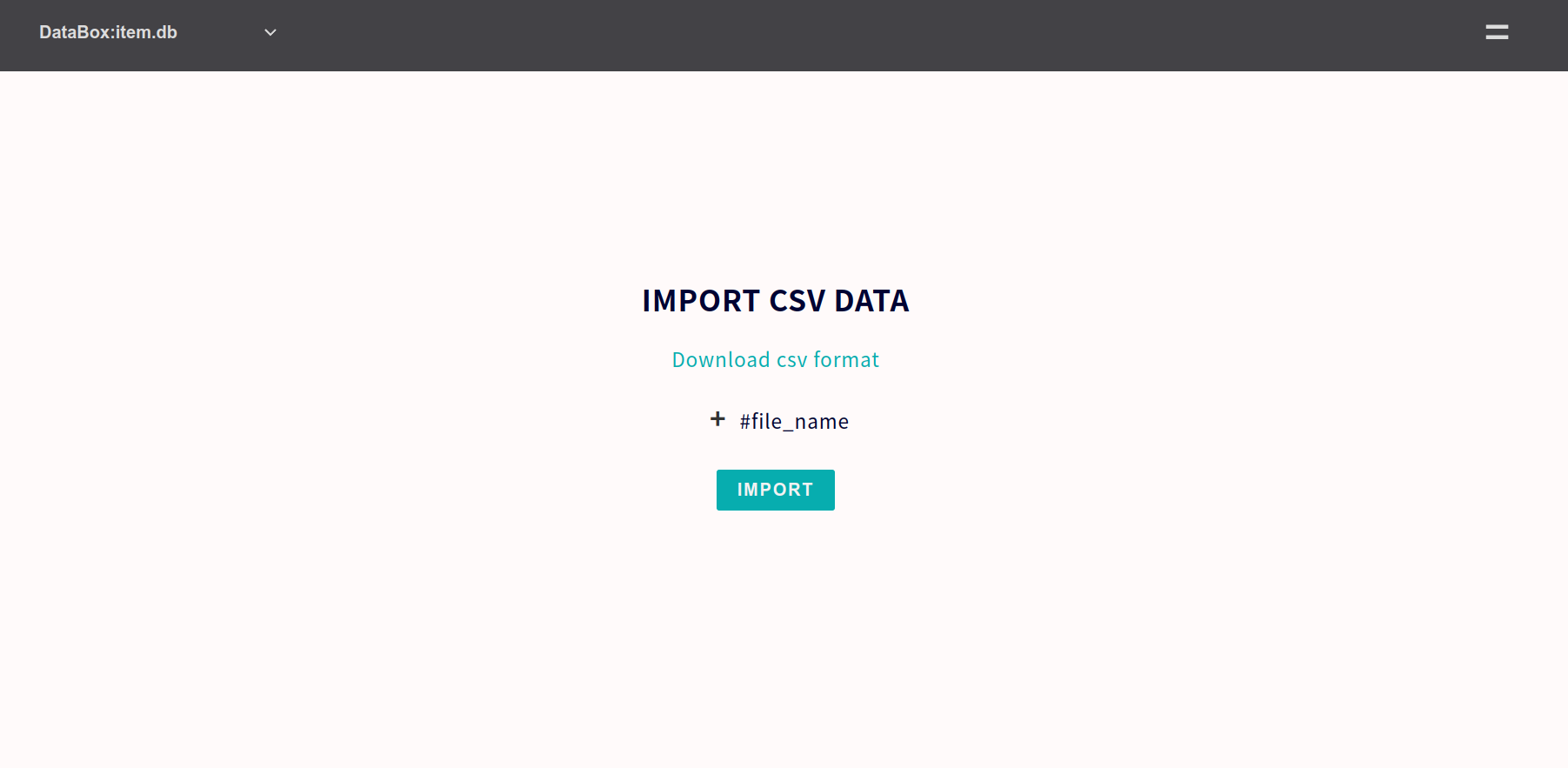
You can import data through Web App or batch command. csv format can be downloaded from Base App table #csv tag or import form.
Note
When adding new data, if you haven't defined a primary key and are just using a hash ID (#ID), please enter "new" in the ID field.
Import through Base App
You can import data from Base App "Data Import" menu. Import format can be download on the page.
Import through batch
Instead of Web UI, you can also import data through bat_import script.
sudo /usr/local/small-shell/util/scripts/bat_import.sh $your_authkey $your_databox $your_file
tail -f /usr/local/small-shell/tmp/log/${session}.log
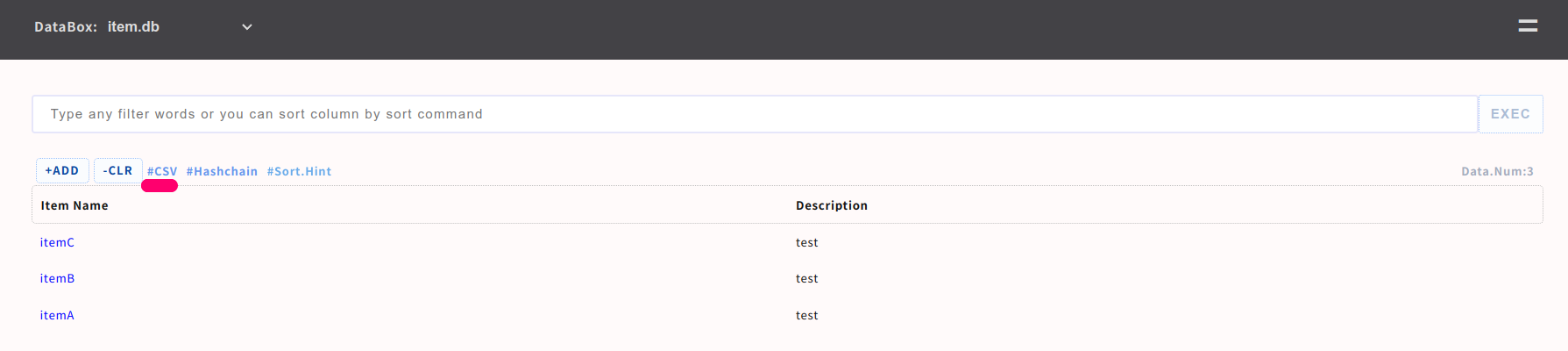
Export data through App
You can export data with csv format on Base App table.
Delete databox
There is util script for deleting databox.
usage: sudo /usr/local/small-shell/util/scripts/del_databox $your_databox
Verified environment
OS: Ubuntu 2x (recommnded), Debian 1x, macOS Tahoe, Almalinux 9.x, CentOS 7, RHEL 8
bash: 4.x
curl: 7.x

# REQUIRED commands
Core commands : sha256sum, flock, base64
awk : above 3 that can use "IGNORECASE = 1;" option
sed : above 4.2.2 that can use "-z" option
PHP : any version which have PHP url encyption libraries